i18n - Internationalisation
The Project Nobody Touched for 15 Years. Until Now.
Lead Product Designer · Pronto Software · System Re-Architecture · Global ERP Localisation


"Pronto Software hadn't cracked internationalisation in 15 years.Every attempt had failed or stalled.The CMO and project leadership came to me.Not to redesign it. To solve it — at a system level — once and for all."

WHY THIS PROJECT MATTERS — THE GLOBAL CONTEXT
Internationalisation is the single most underestimated challenge in enterprise software.Most ERP platforms treat it as a translation problem. Add a language file. Swap the strings. Ship it.That approach fails — consistently and expensively.
Global enterprises aren't dealing with one country and a couple of modules. They're dealing with multiple regions, multiple system requirements, and multiple stakeholders. Managing all aspects of a global implementation — including business process mapping, cultural differences, and varying regulations — requires careful planning and execution.
Localisation goes beyond language translation to include date formats, number formats, address structures, legal document templates, and payment methods.
And for an enterprise ERP like Pronto Xi — used across 1,500+ organisations, across 24 integrated modules, across retail, wholesale, manufacturing, payroll, HR, and supply chain — the complexity is exponential.Pronto Software knew this. Which is why, for 15 years, the problem had remained unsolved.
Then they gave it to me.
THE BRIEF — WHY PRONTO TRUSTED ME WITH THIS
I was appointed Lead Product Designer on the Pronto Lexicon project — Pronto Software's most strategically significant, longest-outstanding, and commercially critical UX initiative.The brief came directly from senior leadership — the Chief Marketing Officer and project head — because this wasn't a feature request. It was a business expansion blocker.
Pronto Xi had customers wanting to expand internationally. Distributors and partners in new markets wanting to deploy the platform. Revenue sitting on the table that couldn't be captured because the product wasn't internationalisation-ready.Every previous attempt to solve it had stalled because it had been treated as a development problem — a task for engineers to add language files and move on.
Nobody had ever approached it as a system design problem that required a Lead Designer to re-architect the entire experience foundation from the ground up.That's what I was brought in to do.
UNDERSTANDING THE PROBLEM — WHAT 15 YEARS OF NEGLECT LOOKS LIKE
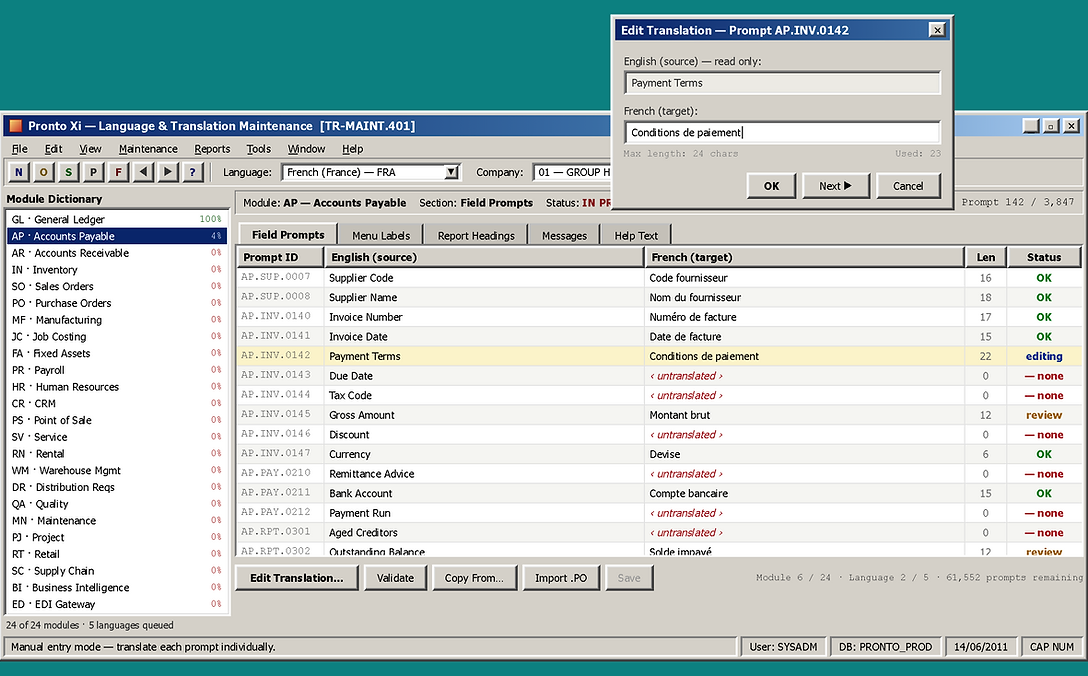
Before touching a single design tool, I spent weeks inside the existing system — mapping every layer of the internationalisation failure.What I found was not a translation problem. It was an architectural problem that had compounded across 15 years and 24 modules.
Layer 1 — Hard-coded text everywhere.
Thousands of UI strings — labels, error messages, tooltips, button text, system notifications — were hard-coded directly into the interface. Not referenced from a centralised content system. Not structured for extraction or replacement. Just written directly into the UI and left there.To translate the product, you would need to manually find and replace every single hard-coded string across every module. An impossible maintenance task. A guaranteed consistency failure.
Layer 2 — No translation context.
Even where text could theoretically be extracted, there was no context attached to it. A word like "Account" means something different in a Finance module versus a CRM module versus a Customer Management screen. Without context, translation engines — human or automated — produced inconsistent, sometimes incorrect results.
Layer 3 — UI not designed for language flexibility.
English is a compact language. German runs 20–40% longer. French 15–30%. Arabic reads right to left. Chinese uses character-based rendering with entirely different spacing requirements.The Pronto Xi interface had been designed exclusively for English — fixed-width labels, rigid column layouts, no text expansion tolerance. In German, buttons overflowed. In French, labels truncated. In Arabic, the entire layout broke.
Layer 4 — No process for ongoing translation management.
Even if a translation was completed today, how would it be maintained as the product evolved? New features. New labels. New modules. There was no workflow, no tooling, and no governance model for keeping translations current.
Layer 5 — No visibility for administrators.
System administrators deploying Pronto Xi for international clients had no way to see translation coverage, identify gaps, track errors, or manage the translation state across modules. They were flying blind.
The core insight that reframed everything:
"This was never a translation problem.It was a system architecture problem that had been misdiagnosed for 15 years.Solving it required re-architecting the content foundation of the entire platform —not adding a language file"
COMPETITIVE ANALYSIS — HOW THE MARKET WAS SOLVING IT

The competitive gap was stark and urgent.
Every major ERP competitor had solved the foundational internationalisation architecture. Pronto Xi hadn't. This wasn't just a UX problem — it was a competitive positioning problem that was limiting market expansion and revenue growth.But the competitive analysis also revealed an opportunity: none of the competitors had fully solved one-click automated translation for system administrators. That gap became the centrepiece of the Pronto Lexicon solution.
I ran a structured discovery programme before any design work began — because designing a solution without fully understanding the system would have produced exactly the kind of partial fix that had failed for 15 years before me.
DISCOVERY & RESEARCH — HOW I MAPPED THE REAL PROBLEM
1. System audit — Module-by-module audit of all 24 Pronto Xi modules to identify every instance of hard-coded text, inconsistent terminology, and UI layout that would break under language expansion. Documented at component level, not module level.
2. Current workflow validation — Mapped the existing translation workflow end-to-end: how translations were currently attempted, where they failed, who was responsible, and what the downstream impact was when they broke.
3. Stakeholder interviews — CMO, project leadership, engineering leads, and implementation partners who had direct experience with client internationalisation failures. These conversations confirmed that every previous attempt had stalled at the architectural layer, not the design layer.
4. Global user research — Research with non-English speaking users and administrators from target international markets to understand how the existing interface failed them — not just linguistically, but structurally.
5. Competitor benchmarking — Detailed analysis of how SAP, NetSuite, Microsoft Dynamics, and Odoo had approached the same problem — what they'd solved, what they'd missed, and where Pronto Xi had a genuine opportunity to differentiate.
6. Technical feasibility assessment — Deep collaboration with engineering to understand what was architecturally possible: which content could be extracted to a dictionary level, what API integrations were viable, and what the POC scope should be.
What the discovery confirmed:
The problem had five distinct layers — hard-coded content, missing translation context, UI inflexibility, no management workflow, and no administrator visibility. Any solution that didn't address all five layers simultaneously would fail — exactly as every previous attempt had.
THE DESIGN STUDIO — SOLVING SYSTEM PROBLEMS WITHOUT STARTING WITH UI
This is the part of the process that most designers skip. I didn't.Before opening Figma, I ran a series of design studios — collaborative working sessions with engineering, product management, and business stakeholders — focused entirely on the system architecture, not the interface.What we worked through in the design studios:
A. Content key architecture — How should translatable content be structured at a dictionary level? What naming conventions would scale across 24 modules? How do we attach context to every key so translators — human and automated — understand what they're translating?
B. Translation API integration model — How should the Google Cloud Translation API connect to the Pronto Xi content system? What's the fallback model when an automated translation is unavailable or below confidence threshold? How do we handle translation versioning as the product evolves?
C. Module scanner architecture — How does the system identify all translatable content across 24 modules automatically, without manual cataloguing? What triggers a re-scan when new content is added?
D. Administrator workflow design — What does a system administrator actually need to manage translations at scale? What visibility, control, and error-correction capability do they need? How do we make a complex technical process feel like a manageable operational task?
E. POC scope definition — What is the minimum viable architecture that demonstrates the full system working end-to-end? What do we need to prove in the test environment before committing to full platform rollout?
The principle that governed every DESIGN studio session:
Design the system first. The interface will follow.A beautiful UI on a broken architecture is still broken.
THE SOLUTION — PRONTO LEXICON SYSTEM ARCHITECTURE

THE SOLUTION — PRONTO LEXICON SYSTEM ARCHITECTURE
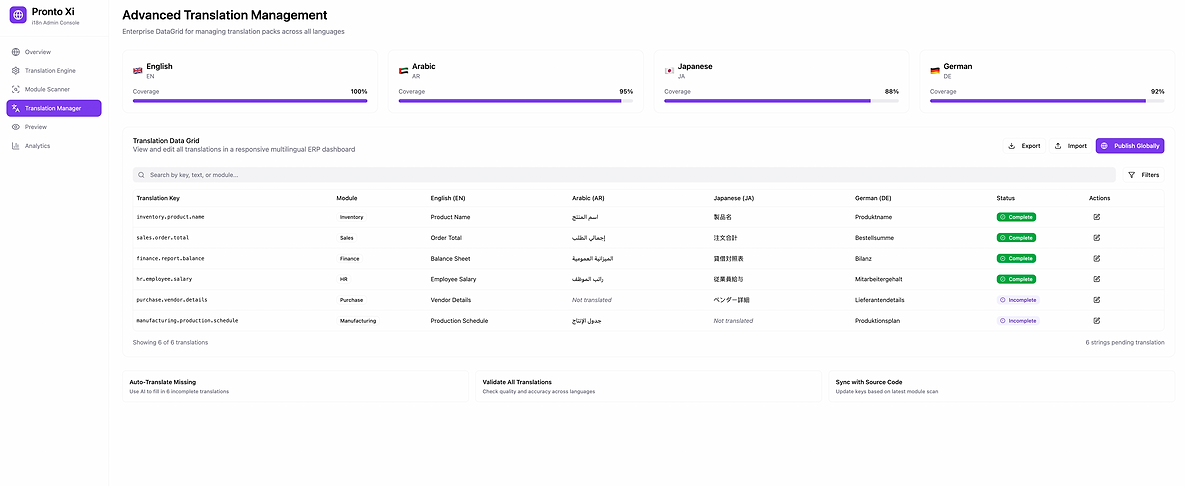
THE TRANSLATION MANAGER - Administrator control and visibility
For system administrators deploying Pronto Xi in international markets, I designed a Translation Manager — a dedicated administrative interface that gives complete visibility and control over the entire translation state of the platform.

THE DICTIONARY SYSTEM - Replacing hard-coded text at the foundation
Every translatable string across all 24 Pronto Xi modules was extracted from the interface and structured into a centralised content dictionary — a single source of truth for every label, error message, tooltip, button, notification, and system text in the product.

THE TRANSLATION ENGINE - Google Cloud Translation API integration
I designed the integration between the Pronto Lexicon dictionary and the Google Cloud Translation API — creating an automated translation pipeline

THE MODULE SCANNER - Automated content identification across 24 modules
Rather than requiring manual cataloguing of translatable content — which had been the failure point of every previous attempt — I designed an automated module scanner
LIVE PREVIEW SYSTEM - See the translation before deploying it
Before any translation is deployed to a live client environment, administrators can preview exactly how the translated interface will render — in the target language, in the actual Pronto Xi UI — across any module.
The preview system catches layout issues (text expansion, truncation, RTL rendering) before they reach clients. It was a direct response to the discovery finding that UI breakage under language expansion had been a persistent, client-facing failure in every previous internationalisation attempt.

ANALYTICS & TRANSLATION HEALTH DASHBOARD - Ongoing visibility, not a one-time fix
The final layer of the system — a translation health dashboard that gives administrators ongoing visibility into the internationalisation state of every Pronto Xi deployment.

ONE-CLICK AUTOMATED TRANSLATION PROCESS
The capability no competitor had fully solved
The centrepiece of the Pronto Lexicon system — and the feature that most directly addressed the business objective of reducing administrator workload and accelerating international deployments.
UI FOR LANGUAGE FLEXIBILITY — DESIGNING THE INTERFACE ITSELF
In parallel with the system architecture, I redesigned the Pronto Xi interface to be genuinely language-flexible — not just theoretically translatable.
What this required:Text expansion tolerance — All UI components redesigned to accommodate 20–40% text expansion for Germanic and Romance languages. Labels flex. Buttons expand. Layouts reflow. Nothing truncates or breaks.
RTL (right-to-left) support — Layout architecture updated to support Arabic and Hebrew rendering — mirrored navigation, reversed reading flow, appropriate text alignment.
Date, time, and number formatting — All date, time, currency, and number displays connected to locale-aware formatting — ensuring that an Australian date format (DD/MM/YYYY) renders correctly for a US client (MM/DD/YYYY) or a European client (YYYY-MM-DD) without any manual configuration.
Character set support — UI rendering tested and validated for Latin, Cyrillic, Arabic, and CJK (Chinese, Japanese, Korean) character sets.
POC — PROVING IT IN THE TEST ENVIRONMENT
No architecture is real until it's running. I drove the Proof of Concept phase — working directly with engineering to implement the Pronto Lexicon system in the Pronto Xi test environment.
What the POC validated:
-
Dictionary extraction from 3 pilot modules (Finance, CRM, Inventory)
-
Module scanner operation and content identification accuracy
-
Google Cloud Translation API integration and response handling
-
One-click translation workflow end-to-end
-
Live preview rendering across 2 target languages (German and simplified Chinese)
-
Administrator Translation Manager operation
Layout rendering validation under text expansion
The POC confirmed the architecture was sound and the one-click process worked as designed. It also surfaced specific edge cases — content strings with embedded variables, module-specific terminology conflicts, confidence threshold calibration — that were resolved before the system was documented for full platform rollout.
IMPACT & OUTCOMES
System outcomes
-
Hard-coded text eliminated across pilot modules — replaced with structured dictionary keys scalable across all 24 modules
-
One-click translation workflow fully designed, integrated, and POC-validated — reducing administrator effort from weeks to minutes
-
Translation consistency guaranteed by the dictionary system — no more context-free string replacement producing incorrect results
-
UI language flexibility built into the component system — text expansion, RTL support, and locale-aware formatting handled natively
-
Administrator visibility delivered for the first time — translation coverage, error rates, and deployment status visible at a glance
Business outcomes
-
International market expansion unblocked — Pronto Xi deployable in new regions without the translation failures that had previously stalled implementations
-
Competitive positioning addressed — Pronto Xi's i18n capability now comparable to SAP, NetSuite, and Microsoft Dynamics at system level
-
Implementation failure rate reduced — live preview and pre-deployment validation prevent the client-facing UI breakage that had been a recurring issue
-
Administrator efficiency dramatically improved — one-click automation replaces weeks of manual, error-prone translation work
-
Revenue opportunity unlocked — international licensing and deployment revenue previously blocked by i18n limitations now accessible
CONCLUSION
Internationalisation is not about translating words.It's about designing systems that work across cultures, languages, and contexts.By re-architecting Pronto Xi's i18n foundation from the ground up —after 15 years of failed attempts —I didn't just solve a UX problem.I unlocked international markets.